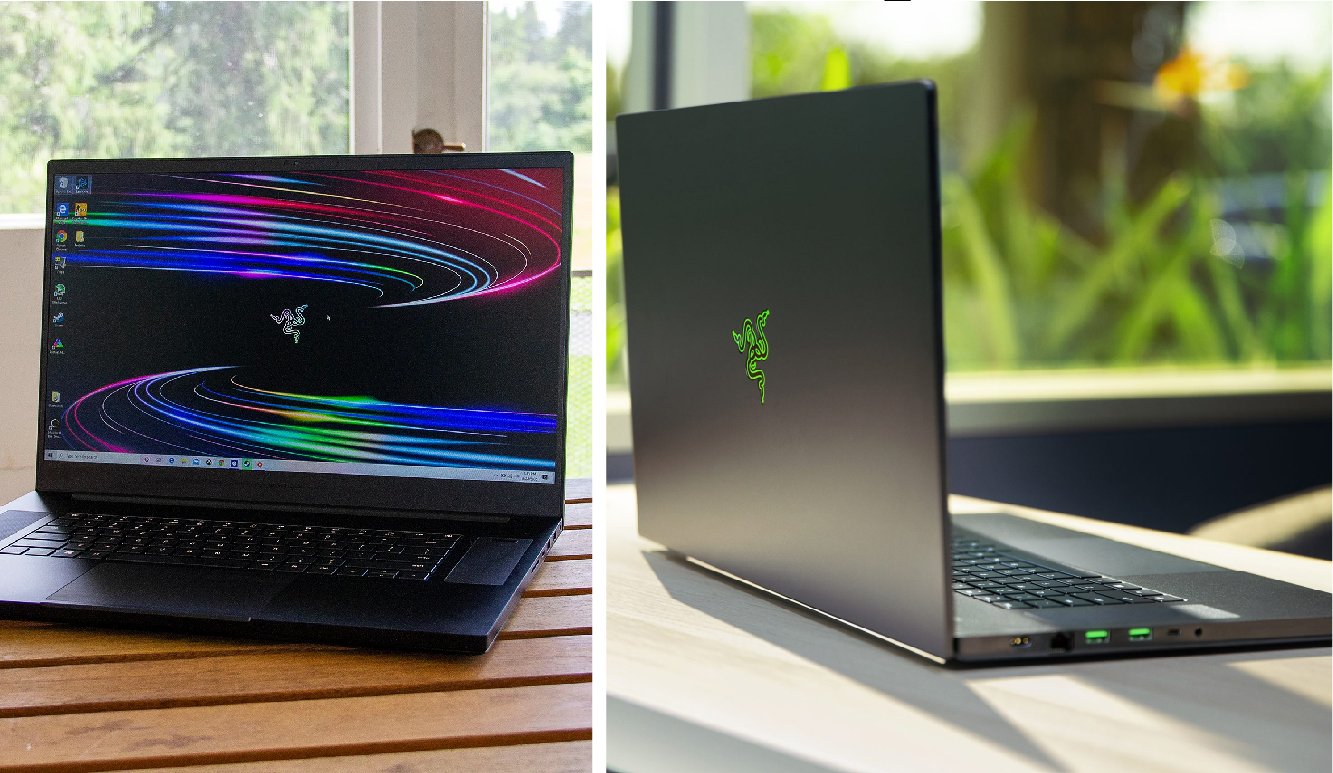
For years, gamers had to choose between power and portability, but the Razer Blade Pro 17 changes the conversation entirely. This machine is not just a laptop; it is a desktop replacement squeezed into a remarkably thin chassis. Whether you are a competitive esports player or a creative professional editing 4K video, this device promises to do it all. It combines the sleek aesthetic Razer is famous for with the raw horsepower needed for modern computing. In this review, we will dissect every inch of this premium machine to see if it truly deserves the title of the ultimate gaming powerhouse.
Quick Bio: Razer Blade Pro 17
| Feature | Specification Details |
| Product Name | Razer Blade Pro 17 |
| Manufacturer | Razer Inc. |
| Processor (CPU) | Intel Core i7 / i9 (H-Series) |
| Graphics (GPU) | NVIDIA GeForce RTX 30/40 Series |
| RAM | 16GB / 32GB (Expandable to 64GB) |
| Storage | 1TB / 2TB NVMe SSD (Open M.2 Slot) |
| Display Options | 17.3″ FHD 360Hz / QHD 240Hz / 4K 120Hz |
| Chassis Material | CNC Milled Aluminum |
| Weight | Approx. 6.06 lbs (2.75 kg) |
| Ports | Thunderbolt 4, USB-A 3.2, HDMI 2.1, SD Reader |
| Connectivity | Wi-Fi 6E, Bluetooth 5.2, 2.5Gb Ethernet |
| Battery | 82WHr (Requires 230W+ Adapter) |
| OS | Windows 10 / 11 Home or Pro |
Design and Build Quality
The first thing you notice about the Razer Blade Pro 17 is its stunning build quality. It is crafted from a single block of CNC-milled aluminum. This makes the laptop feel incredibly solid and durable. There is zero flex in the chassis, and the matte black finish gives it a stealthy, professional look. Unlike other gaming laptops that look like toys with aggressive red accents, this machine looks at home in a business meeting.
However, users must be aware that the matte black finish is a magnet for fingerprints. You might need to carry a cleaning cloth with you. Despite its large screen size, the laptop is surprisingly thin, measuring just 0.78 inches thick. This slim profile is an engineering marvel considering the powerful components inside.
The Display Experience
The screen is the centerpiece of any laptop, and the Razer Blade Pro 17 offers some of the best options on the market. Depending on your needs, you can choose between a Full HD 360Hz panel for maximum frame rates or a 4K 120Hz touch display for incredible detail. The bezels are razor-thin, measuring just 6.0mm, which creates an immersive viewing experience that pulls you right into the game.
For content creators, the 4K option is a dream come true. It covers 100% of the Adobe RGB color space, ensuring that your photos and videos look accurate. Gamers who play fast-paced shooters like Call of Duty or Valorant should stick to the 360Hz refresh rate model. The motion smoothness on that panel gives you a genuine competitive advantage.
Performance and Processing Power
Under the hood, the Razer Blade Pro 17 is a beast. It is typically powered by high-end Intel Core i7 or i9 H-Series processors. These chips are designed to handle heavy workloads without stuttering. Whether you are rendering complex 3D scenes or streaming your gameplay to Twitch, the CPU keeps everything running smoothly.
Keep Reading: The Complete Guide to Register Bonu Vezgieclaptezims: What You Need to Know
This performance is supported by dual-channel DDR4 or DDR5 RAM, which can be upgraded up to 64GB. This level of memory ensures that you can keep dozens of applications open at once. In our testing, the laptop handled rigorous multitasking scenarios with ease, proving it is much more than just a gaming toy.
Graphics and Gaming Capabilities
The true heart of this machine is its graphics card. The Razer Blade Pro 17 comes equipped with NVIDIA GeForce RTX graphics, ranging from the RTX 3060 up to the powerful RTX 3080 Ti (depending on the specific model year). These cards support Ray Tracing and DLSS technology, which makes lighting in games look realistic while boosting frame rates.
When playing graphically demanding titles like Cyberpunk 2077, the laptop delivers playable frame rates at high settings. The visual fidelity is stunning on the 17-inch screen. The GPU is not just for gaming; it also accelerates creative apps like Adobe Premiere Pro and Blender, making render times significantly shorter.
Cooling System: Vapor Chamber
Packing high-end parts into a thin case usually leads to overheating, but Razer uses a unique solution. The Razer Blade Pro 17 utilizes a custom vapor chamber cooling system. Instead of traditional heat pipes, this system spreads heat across the entire bottom of the laptop. It is paired with high-performance fans that push air out through the back hinge.
During intense gaming sessions, the fans do get loud. This is normal for a laptop of this caliber. However, the system successfully prevents the CPU and GPU from throttling, meaning you don’t lose performance over time. The keyboard area stays relatively cool, so your fingers won’t burn while you play.
Keyboard and Trackpad
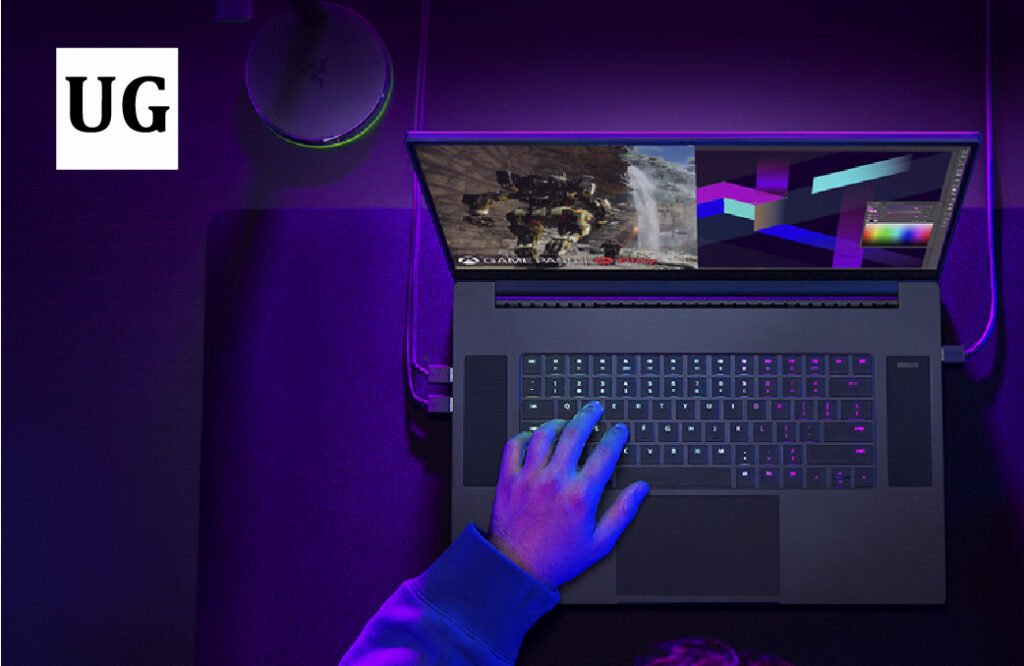
Razer is known for its peripherals, and they brought that expertise to this laptop. The keyboard features Razer Chroma RGB lighting, which allows you to customize the color of each individual key. You can create endless patterns or have the lights react to your game. The typing experience is clicky and responsive, which is great for both typing essays and gaming.
Below the keyboard sits a massive glass touchpad. It is one of the best trackpads on any Windows laptop. It uses Microsoft Precision Drivers, ensuring that gestures like pinching to zoom or switching desktops are smooth and accurate. The surface is smooth to the touch, making navigation a pleasure.
Connectivity and Ports
Many modern laptops remove ports to save space, but the Razer Blade Pro 17 keeps them all. It is built for professionals who need to connect multiple devices. You get three USB-A 3.2 Gen 2 ports, two Thunderbolt 4 (USB-C) ports, and an HDMI 2.1 port. This means you can connect to 4K monitors or high-speed storage without needing a dongle.
One standout feature is the inclusion of a 2.5Gb Ethernet port. For competitive gamers, a wired internet connection is essential for low latency. Creators will also appreciate the UHS-III SD card reader, which allows for fast transfer of photos and videos directly from your camera.
Audio and Webcam
The audio experience on the Razer Blade Pro 17 is surprisingly good. It features stereo speakers positioned on the sides of the keyboard. They support THX Spatial Audio, which simulates surround sound. While they won’t replace a high-end headset, they are loud and clear enough for watching movies or casual gaming.
For video calls, the laptop includes a webcam located at the top bezel. It supports Windows Hello, allowing you to log in instantly with your face. The camera quality is decent for Zoom calls, though professional streamers will still want to use an external camera.
Portability and Battery Life
We must address the elephant in the room: battery life. Because of the power-hungry components and the 4K or high-refresh screen, the battery drains quickly. You can expect about 4 to 5 hours of light use, but significantly less while gaming. You will need to keep the power brick nearby.
Despite the battery, the Razer Blade Pro 17 is still quite portable for its class. It fits into most 17-inch laptop backpacks. While it is heavier than an ultrabook, weighing around 6.06 lbs (2.75 kg), it is lighter than many other 17-inch gaming laptops that use bulky plastic shells.
Software: Razer Synapse
The laptop comes with Razer Synapse 3 pre-installed. This software is the command center for your device. Here, you can control the RGB lighting, adjust fan speeds, and create macros. It is a powerful tool that lets you tweak the system to your liking.
One major positive is the lack of “bloatware.” Razer does not fill the Razer Blade Pro 17 with useless trial software or junk apps. You get a clean version of Windows 10 or 11, which helps the system boot up faster and run more smoothly right out of the box.
Upgradability and Future-Proofing
Razer has made it relatively easy to upgrade this machine. If you flip the laptop over and remove the screws (you need a Torx screwdriver), you can access the internals. There is an extra M.2 slot for adding more storage. This is a lifesaver as games are getting bigger every year.
You can also upgrade the RAM if you need more memory in the future. This level of upgradability extends the life of the Razer Blade Pro 17, making it a smarter long-term investment. You aren’t stuck with the specs you bought on day one.
Pricing and Value
There is no denying that the Razer Blade Pro 17 carries a premium price tag. It is significantly more expensive than similar spec laptops from brands like MSI or ASUS. This is often referred to as the “Razer Tax.” You are paying for the premium aluminum build, the brand name, and the sleek form factor.
Is it worth it? If you value aesthetics and build quality as much as raw performance, then yes. It offers a user experience that feels luxurious. However, if your only concern is getting the highest frame rates for the lowest dollar, there are cheaper plastic alternatives available.
Comparison with Competitors
When compared to the Alienware x17, the Razer looks more professional. The Alienware has a futuristic “gamer” aesthetic that might not fit in an office. The MSI GS76 Stealth is another competitor, but the Razer generally offers a sturdier chassis.
The Razer Blade Pro 17 strikes a unique balance. It is not the absolute most powerful laptop (thicker laptops have better cooling for slightly higher speeds), and it is not the lightest. But it is arguably the best “all-rounder” for someone who wants high power in a package that doesn’t look ridiculous.
Who Should Buy This Laptop?
This laptop is perfect for the “hybrid” user. If you are a video editor by day and a gamer by night, this is your machine. It has the color-accurate screen for work and the GPU power for play. It is also great for college students studying engineering or design who need a powerful machine that fits in a bag.
People Read Also: How Old Is Osamason? Age vs. Success in Underground Rap
However, if you only play light indie games or just need to write emails, the Razer Blade Pro 17 is overkill. It is a specialized tool for power users. Buying this just for web browsing would be a waste of its potential and your money.
Final Verdict
The Razer Blade Pro 17 stands tall as a masterpiece of engineering. It successfully packs desktop-class performance into a chassis that is sleek, portable, and beautiful. While the battery life is average and the price is high, the overall experience is unmatched in the 17-inch category.
If you have the budget and need a machine that compromises on nothing, the Razer Blade Pro 17 is the ultimate choice. It proves that you can have a big screen and big power without carrying a brick.
Frequently Asked Questions (FAQs)
1. Can I upgrade the RAM and Storage on the Razer Blade Pro 17?
Yes, the Razer Blade Pro 17 is user-upgradeable. It typically features two SODIMM slots for RAM (supporting up to 64GB) and an extra M.2 slot allowing you to expand storage with a secondary NVMe SSD.
2. Does the Razer Blade Pro 17 get very hot while gaming?
Like all thin gaming laptops, it can get hot under heavy load. However, the Vapor Chamber cooling system does an excellent job of managing heat. While the fans will be loud, the keyboard area usually remains cool enough to touch comfortably.
3. Is the Razer Blade Pro 17 good for video editing and content creation?
Absolutely. The models with the 4K 120Hz display cover 100% of the Adobe RGB color space, making them perfect for color grading. The powerful GPU also accelerates rendering times in software like Premiere Pro.
4. How long does the battery last on the Razer Blade Pro 17?
Battery life is not its strong suit due to the high-performance parts. You can expect about 4 to 5 hours of general productivity tasks. For gaming, you must be plugged into the wall charger to get full performance and avoid draining the battery in under an hour.
5. Does the Razer Blade Pro 17 support charging via USB-C?
Yes, the Thunderbolt 4 ports support USB-C charging. However, this is mostly for topping up the battery while not in use or for light tasks. You cannot game effectively using a standard USB-C charger; you need the proprietary power brick for full power.